Join with just your name
Type your name to ask questions, answer polls and react. No email needed.
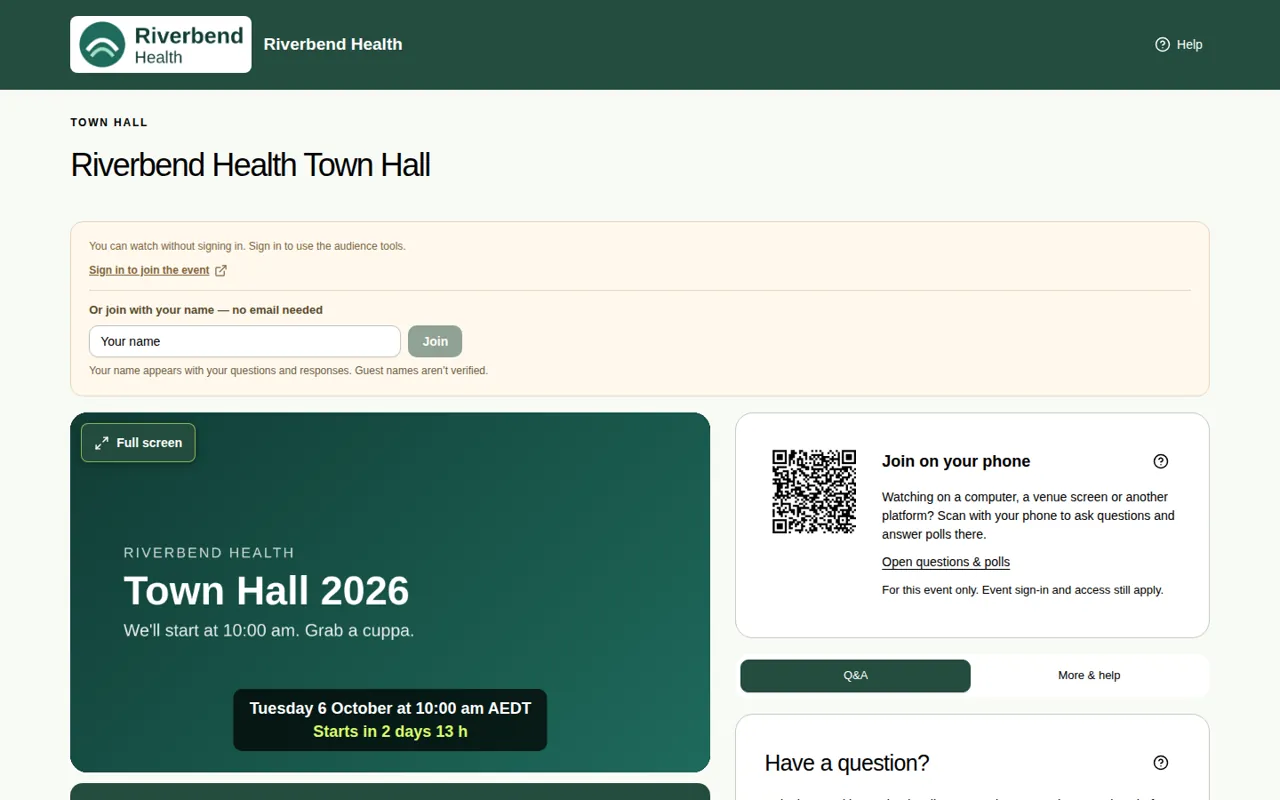
Some events let anyone with the link watch straight away. To ask a question, answer a poll, add to a word cloud or react, you just type your name. You don't need an email address or an account.
Steps
- Open the event link.
- Under Or join with your name — no email needed, type your name in the Your name box.
- Choose Join.
- You can now ask questions, answer polls, add to word clouds and react.
Good to know
- Your name shows next to your questions. Names aren't checked, so the event team sees you as a "guest (unverified)".
- Names can be up to 60 characters. They can't be an email address or include rude words.
- Your guest pass works for this event and its rooms for 24 hours. For a different event, join again or sign in with your email.
- If the organiser changes the event so it needs an email, guest passes stop working. Sign in with your email instead. See Sign in with an email code.
- In full screen, the Q&A tab asks for your name the first time you send something.
- Don't see the name box? The event needs you to sign in or register instead. See Register for an event.
Which events need what
| Kind of event | What you do |
|---|---|
| Anyone with the link | Watch straight away. Type your name to take part. |
| People register first | Fill in a short sign-up form. See Register for an event. |
| Viewers sign in with their email | Sign in with a code sent to your email. See Sign in with an email code. |
| Only people on your guest list | Sign in with the email your invitation was sent to. See Use an invitation. |
There are no passwords anywhere.