What you see before the event starts
The holding slide, the countdown and the start time in your own time zone.
If you open the event early, you'll see a picture instead of the live video. This page explains what you see and what to do while you wait.
While you wait
- Leave the event page open. You don't need to refresh it.
- Look at the box on the video. It shows the start date and time in your own time zone, with a countdown such as "Starts in 2 days 13 h".
- In the last minute, the countdown changes to "Starting soon".
- When the event team is ready, the live video takes the place of the holding slide by itself.
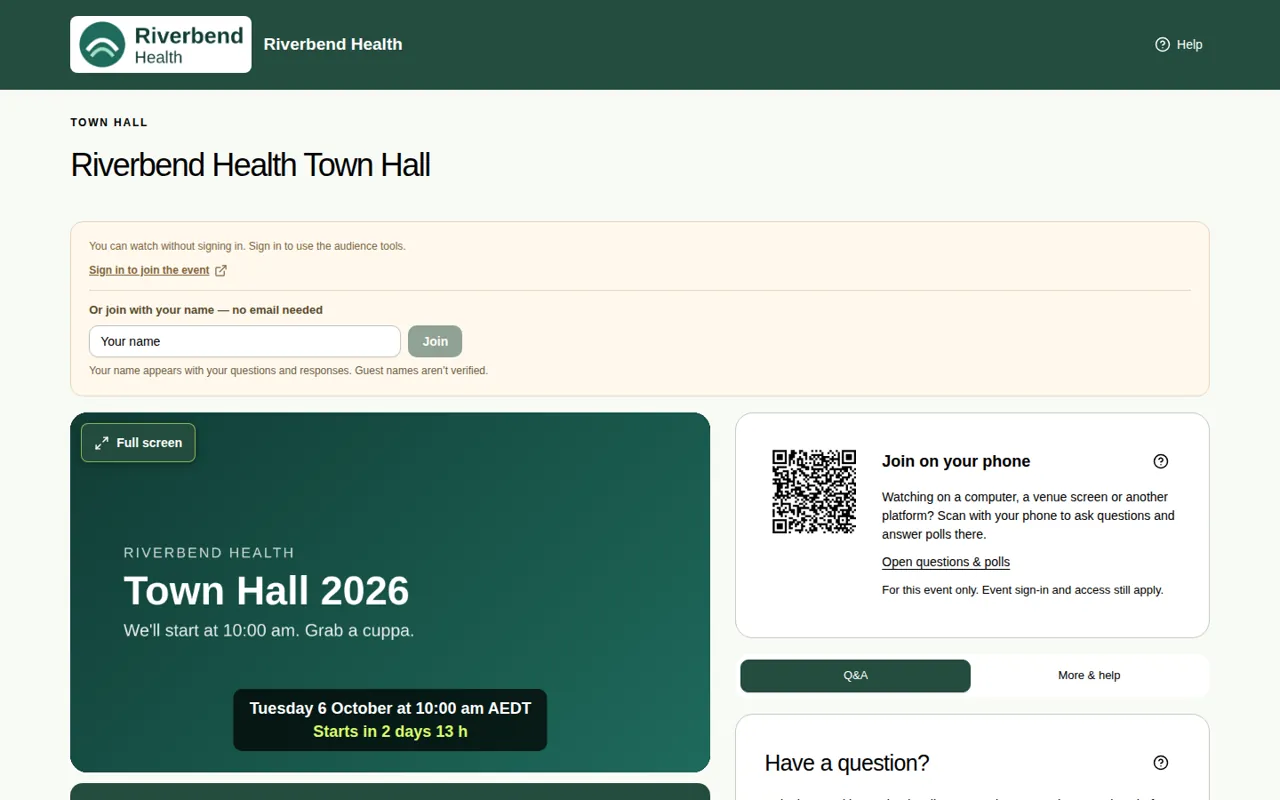
What the video area can show
| What you see | What it means |
|---|---|
| The holding slide with the start time | The event hasn't started yet. Leave the page open. |
| "We'll be with you shortly. The broadcast will appear here when the producer is ready." | The organiser didn't add a holding slide. The event will start soon. |
| The live video | You're watching live. |
| "Your recording is being prepared." | The event has just ended and the replay is being saved. |
| "This event has finished. Thank you for joining us." | The event is over and there's no replay. |
| The replay | You can watch the recording. See Watch the replay. |
| "Replay access has ended." | The organiser set a date for the replay to close, and it has passed. |
Good to know
- A holding slide is the picture you see before the show and during breaks. It has no captions.
- You can get ready while you wait. Type your name or sign in, so you can ask questions and answer polls when the show starts.
- Still only seeing the slide after the start time? The event team may not have started the video yet. See Fix sound and playback problems.