Find new polls and activities
Where polls, quizzes and word clouds appear, and how you know a new one has opened.
An activity is any poll, quiz, rating, ranking, word cloud, open text question or survey. This page shows you where to find them and how you know a new one is open.
Where activities appear
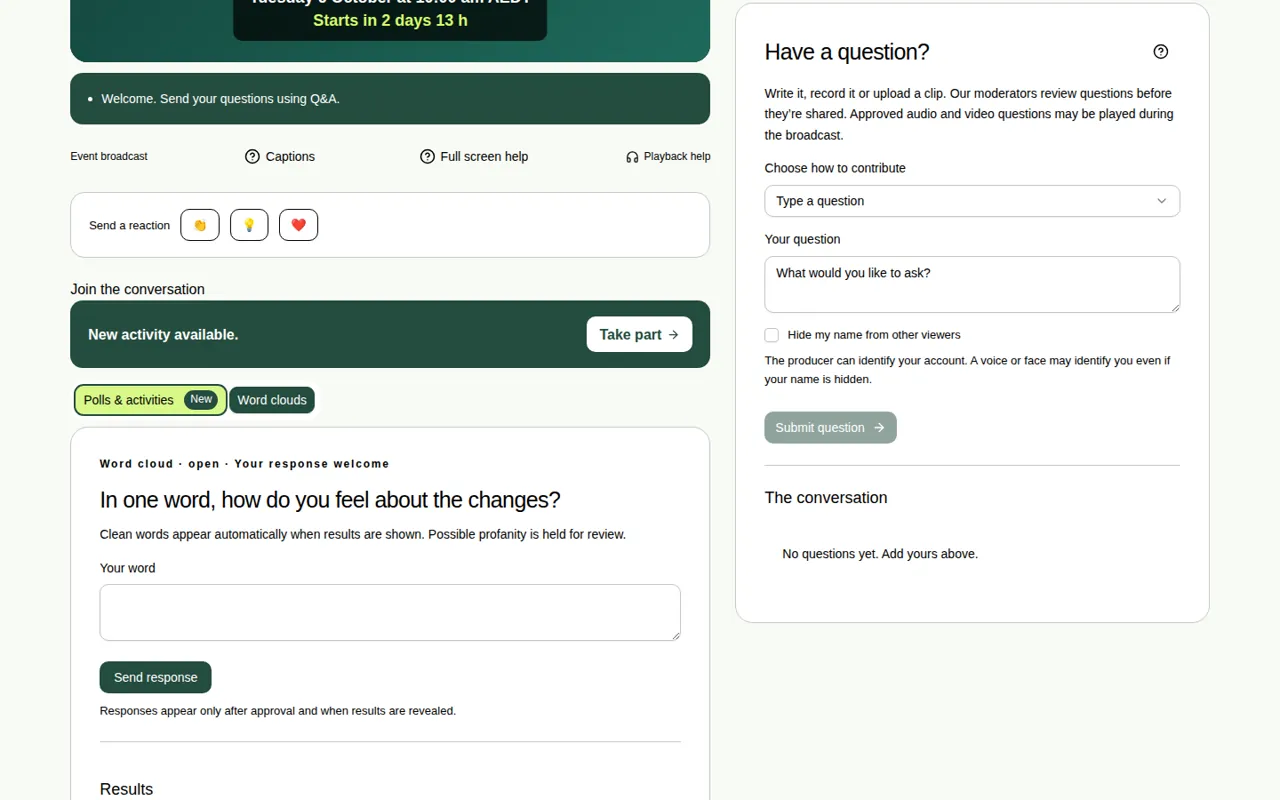
Activities are under Join the conversation, below the video. There are two tabs:
- Polls & activities: multiple choice, rating, ranking, timed quiz, open text and survey.
- Word clouds.
When something new opens
- The tab shows New.
- A message says “New activity available”, with a Take part button.
- Choose Take part to go straight to it.
If nothing is open, the tab says “Nothing open yet. This tab lights up when a new activity opens.”
Reading an activity card
- The top of each card shows its type, whether it's open or closed, and either Your response welcome or Response saved.
- Closed activities stay on the page, so you can see the results.
- You only see the results once the producer chooses to show them.
Good to know
- In full screen, a new poll or word cloud puts a red dot on its tab and pops up a message. See Which activities work in full screen.
- You need to be signed in, registered or joined with your name to take part. See Join with just your name.