Ask a question
Send the speakers a written question, with or without your name showing.
You can send the speakers a written question during the event. This page is for anyone watching who wants to ask something.
To take part, you need to be signed in, registered or joined with your name first. If you aren't, the page says “Sign in to ask questions and take part”. See Join with just your name or Sign in with an email code.
Steps
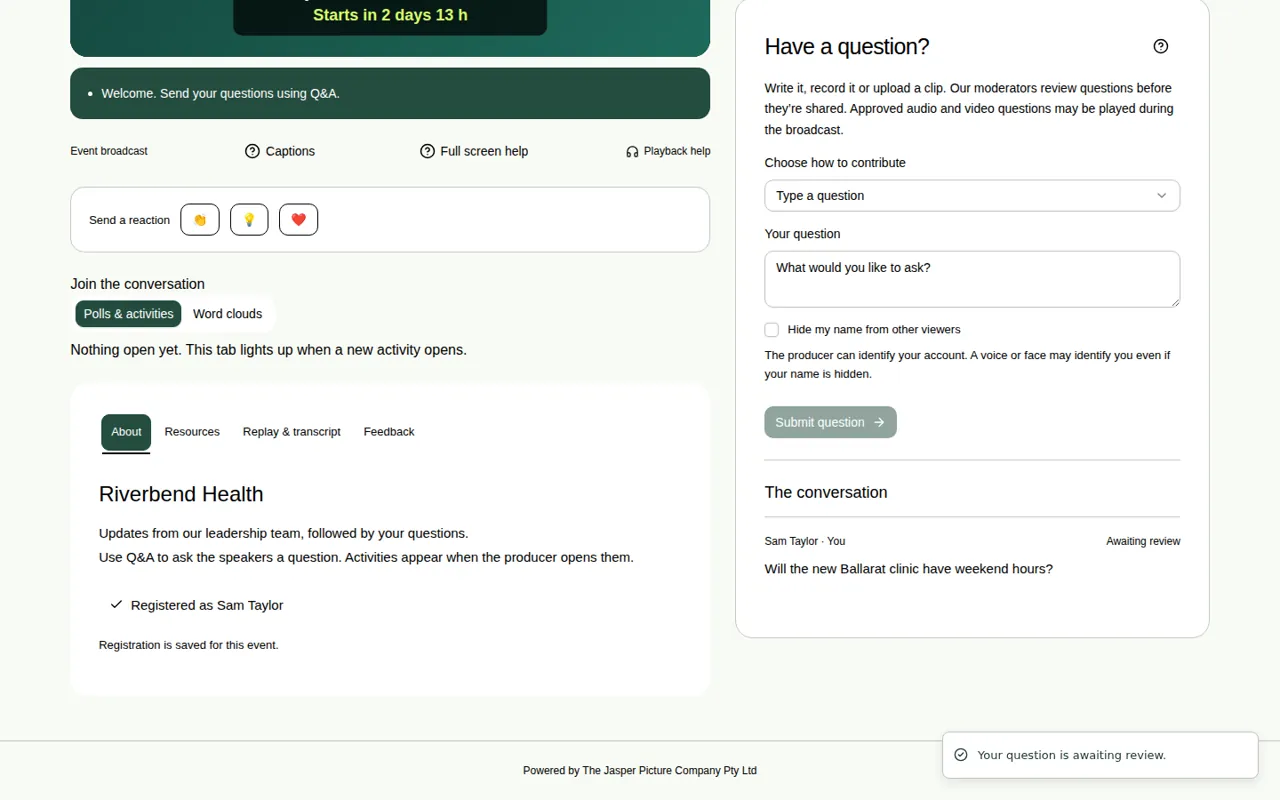
- Open the Q&A tab on the right of the page. In full screen, use the Q&A tab on the right of the video.
- Under Choose how to contribute, pick Type a question.
- Write your question in Your question. You can use up to 1,000 characters.
- If you don't want other viewers to see your name, tick Hide my name from other viewers. Other viewers then see “Anonymous”.
- Choose Submit question.
What happens next
- Most organisers check questions before anyone else sees them. You see Awaiting review next to your question. Only you can see it until the producer approves it.
- If the organiser doesn't check questions first, your question shows straight away. Rude words are still caught and held for checking.
- Your question shows under The conversation, marked “· You”.
- If the producer replies, the reply shows under your question as Response.
Good to know
- Hiding your name only hides it from other viewers. The producer can still see who you are.
- You can also send a question as a recording. See Record an audio or video question.
- Like a question someone else asked? See Support a question.
- Asking from your phone works too. See Take part on your phone with the QR code.
- There are a few limits on how much you can send. See Limits that keep things fair.