Follow what happens to your question
See where your question is up to, why one wasn’t taken, and say whether it was answered.
Every question gets a number and a status, so you can see what's happening to it. This page is for anyone who has asked a question.
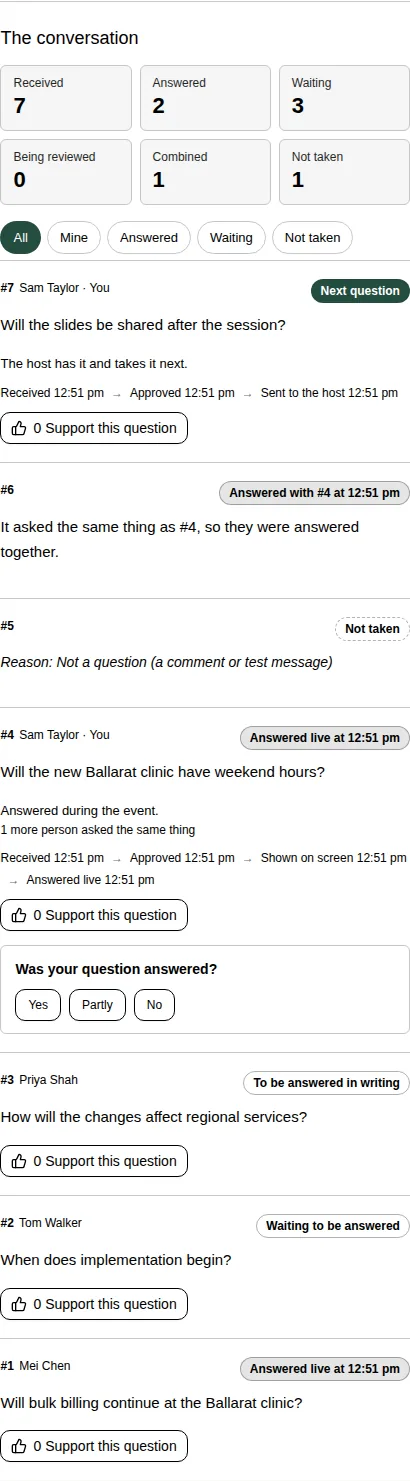
The counts
At the top of The conversation you see how many questions have been received, answered, are waiting, are being reviewed, were combined with another, and were not taken. The organiser can switch these off.
What each status means
| Status | What it means |
|---|---|
| Being reviewed | A moderator checks it before it's shared. Only you can see it. |
| Waiting to be answered | It's approved and everyone can see it. |
| With the host · 3rd in line | The host has it. Two questions are ahead of it. |
| Next question | The host takes it next. |
| Being answered now | It's on screen or with the host on air. |
| Answered live at 11:42 | It was answered during the event. |
| Answered in writing | A written answer is under it, as Response. |
| To be answered in writing | It was taken on notice. The answer comes after the event. |
| Combined with #4 | It asks the same thing as question #4, so they're answered together. |
| Not taken | The moderator didn't take it. The reason is shown under it. |
Under your own question you also see each step with its time, like “Received 11:02 → Approved 11:04 → Sent to the host 11:20 → Answered live 11:42”.
When a question isn't taken
You see your question, and the reason it wasn't taken, such as “Not about the business of the meeting” or “Not reached in the time available”.
Other viewers see only its number and the reason. They never see the wording or who asked.
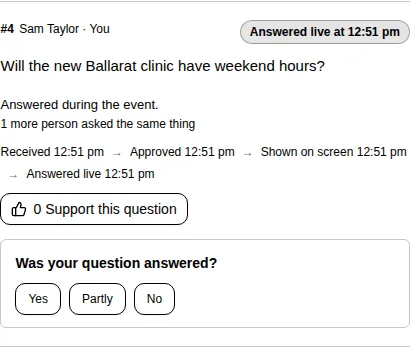
Was your question answered?
Once your question is answered, it asks Was your question answered?
- Choose Yes, Partly or No.
- If you choose Partly or No, you can write what's still unanswered. Choose Send follow-up. The moderator sees it as a follow-up to your original question.
- To record your answer without a follow-up, leave the box empty and choose Send my answer.
Good to know
- You can change your answer later. Choose Change.
- You can send one follow-up for each question.
- Use All, Mine, Answered, Waiting and Not taken to filter the list. You can also search for a question by its number, like #12.