Add documents, chapters and a transcript
Add documents and links for the Resources tab, and chapters and a transcript for the replay.
You can give viewers documents and links, and help them find their way around the replay. These show in the Resources and Replay & transcript tabs on the event page.
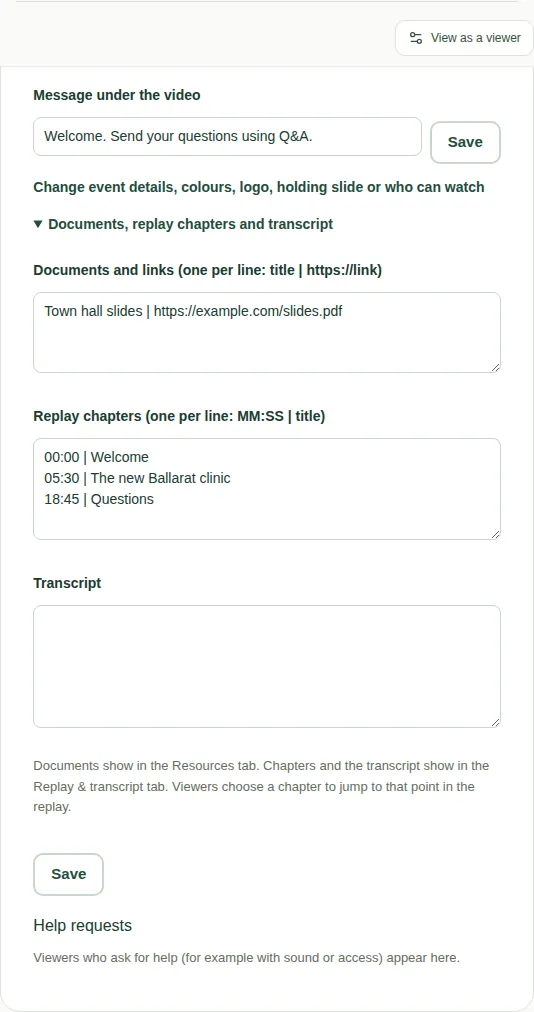
Steps
- On the producer page, find the Event settings box.
- Open Documents, replay chapters and transcript.
- Fill in what you need:
- Documents and links: one per line, as
title | https://link. For exampleAnnual report | https://…. - Replay chapters: one per line, as
MM:SS | title. MM is minutes and SS is seconds from the start. For example05:30 | The new clinic. - Transcript: paste in the full written text of what was said.
- Documents and links: one per line, as
- Choose Save.
What viewers see
- Documents and links appear in the Resources tab.
- Chapters and the transcript appear in the Replay & transcript tab.
- Viewers choose a chapter to jump the replay to that point.
- Viewers can search the transcript and download it.
Good to know
- Chapters work on Castr, YouTube and Vimeo replays.
- To see these tabs the way viewers do, read Use the information tabs and Watch the replay.