Give hosts their links
Make a private host link for each presenter, send it by text or QR code, and cancel it if needed.
Hosts are the people on stage or on camera, such as an MC or a panel. Each host gets a private link to a host page on their phone or iPad. It shows them questions, cues and notes. This page is for producers.
Make a link
- On the producer page, open the Hosts tab in the console.
- Type the host's name in Host’s name, for example "Sam (MC)".
- Choose Create link.
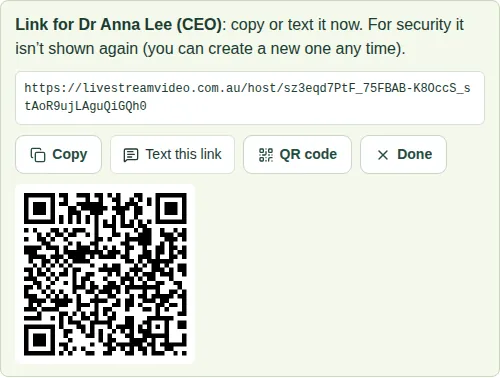
- Send the link now. For security, it isn't shown again. Choose:
- Copy, to copy it;
- Text this link, to open a text message on your phone;
- QR code, so the host can scan it;
- Done when you've finished.
Check and cancel links
The host list shows each host as Connected, Not connected or Link expired.
- Cancel link stops a link working straight away.
- Lost a link? Cancel it and make a new one.
Good to know
- You can have up to 12 hosts per event.
- Each host needs a different name. If two names are the same, add their role, for example "Sam (panel)".
- Hosts don't need to sign in.
- A link only works for this event. It stops working 12 hours after the event finishes.
- Next: Send a question to a host and Send a cue or note.
- Share Open your host page with your hosts so they know what to expect.