Manage registrations
See who has registered, resend a join link, cancel a registration or download the list.
When people register for your event, they appear in a list. You can search it, resend links and download it.
Find the list
- On the producer page, open Reports, records and access.
- Open the Access & invitations tab and scroll to Registrations.
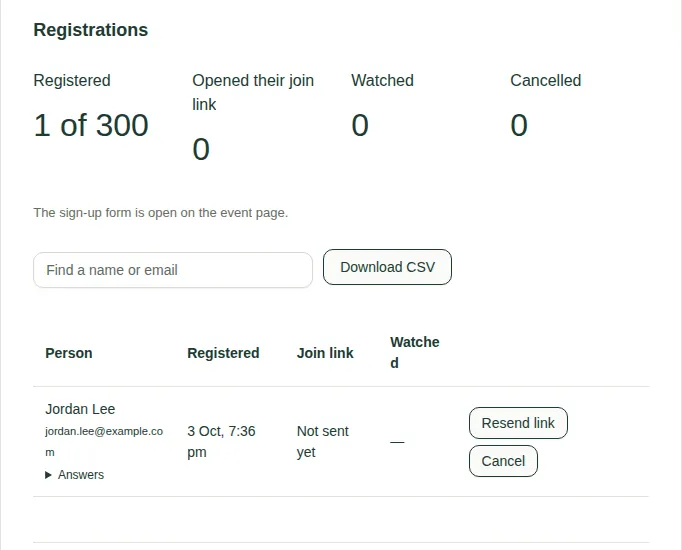
What you see
- Counts: Registered (for example "1 of 300"), Opened their join link, Watched and Cancelled.
- A line that says whether the form is open, closed or full.
- A table of each person: when they registered, their join link status and whether they watched. Open Answers to see their answers to your questions.
What you can do
- Find a name or email searches the list.
- Resend link emails a person their join link again.
- Cancel cancels their registration and stops their link working.
- Download CSV saves the list as a spreadsheet file.
Good to know
- A person's join link is just for them. If someone says they can't get in, try Resend link. See also When you can't get in.
- To set up the form itself, see Set up registration.