Send hosts a cue or a note
Send a quick cue or a lasting note to the hosts’ screens, and see what they’ve seen.
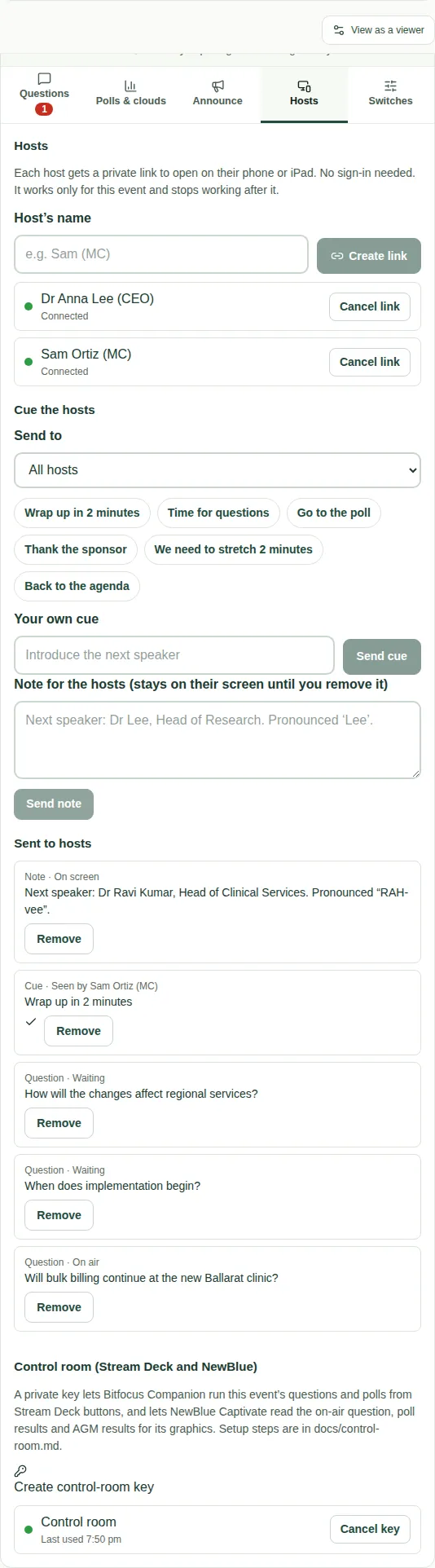
A cue is a short instruction on the host's screen, such as "Wrap up in 2 minutes". It flashes, and phones buzz. A note is something to keep in mind, such as how to say a speaker's name. It stays on screen until you remove it.
Send a cue
- Open the Hosts tab.
- With more than one host, choose who gets it in Send to.
- Choose a quick cue: Wrap up in 2 minutes, Time for questions, Go to the poll, Thank the sponsor, We need to stretch 2 minutes or Back to the agenda.
- Or type Your own cue and choose Send cue.
Send a note
- Type a Note for the hosts.
- Choose Send note.
See what they've seen
Sent to hosts lists everything you've sent and its status:
- questions: Waiting, On air, Answered by a host, the control room or a producer, or Skipped;
- cues: Seen by a host, or Not seen yet. A host taps OK when they've seen it;
- notes: On screen.
Use Back in queue to put a question back. Use Remove to take anything off the hosts' screens.
Good to know
- Hosts need their links first. See Give hosts their links.
- See what hosts see in Cues and notes from the producer.