Put a question on screen
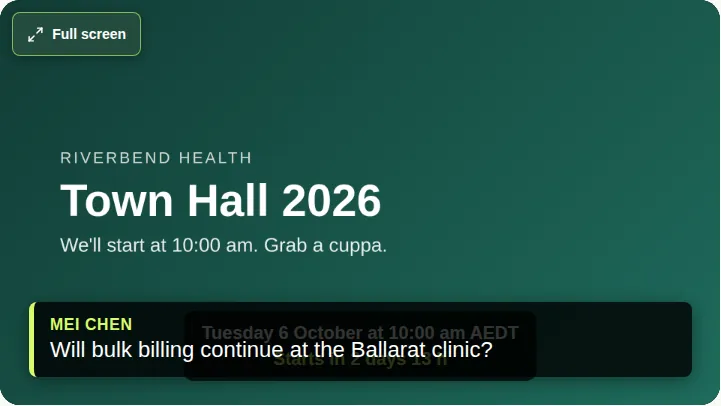
Show an approved question over the video for every viewer, as a strip across the bottom.
You can show a question over the video for every viewer. It appears as a lower third: a strip across the bottom of the video, with the asker's name.
Steps
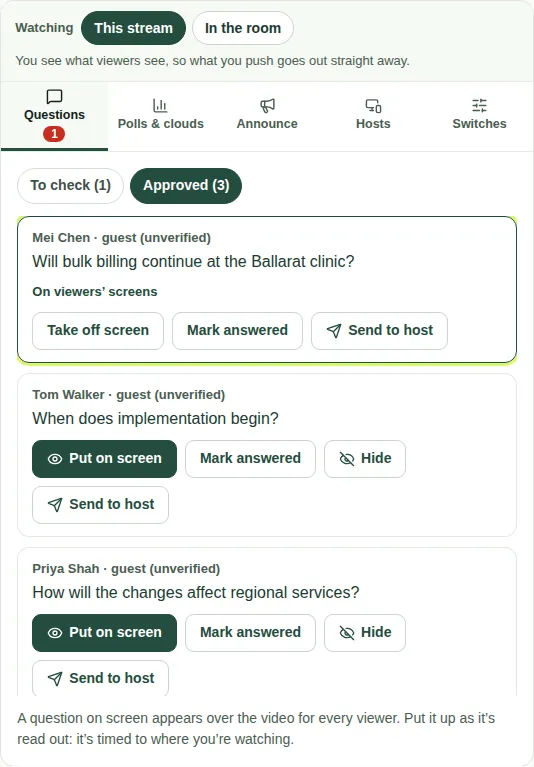
- Open the Questions tab, then Approved.
- Choose Put on screen on the question.
- The question is marked On viewers' screens.
- When it's been answered, choose Take off screen.
Good to know
- Only one question can be on screen at a time.
- Put a question on screen as it's read out. If you're watching In the room, the app times it to match the stream. See This stream or In the room.
- If the asker hid their name, viewers don't see it.
- This is different from the big-screen graphics in the venue. Your JPC producer looks after those.
- See also Mark questions answered.