Check new questions
Approve or hide new audience questions before anyone else sees them.
When Check questions first is switched on, new questions wait in To check. Viewers can't see them until you approve them. This page is for producers and moderators.
Steps
- Open the Questions tab. The red number on the tab is how many questions are waiting for you.
- Choose To check.
- For each question:
- choose Approve to make it public; or
- choose Hide to remove it. The asker isn't told.
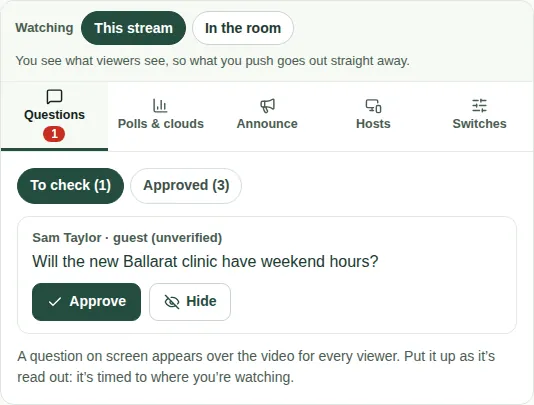
Approved questions move to Approved. Everyone can see them and support them there.
Who asked it
Each question shows who asked it.
- "guest (unverified)" means they joined with just a name. Their name isn't checked.
- "name hidden from viewers" means they asked to be anonymous. You still see the name, but viewers don't.
Good to know
- To turn checking on or off, use the Switches tab. See Turn features on and off.
- Next, you can put a question on screen or send it to a host.