Choose This stream or In the room
Tell the app where you are watching from, so polls and questions reach viewers at the right moment.
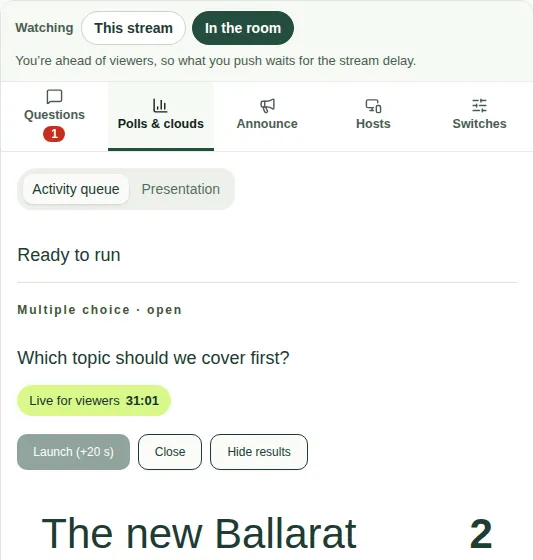
At the top of the console is a choice called Watching. It matters because the live stream runs about 20 to 30 seconds behind real life. Set it before the show.

Which one to choose
- This stream. Choose this if you're watching the stream, like a viewer. Whatever you press goes out straight away, because you're already behind with everyone else.
- In the room. Choose this if you're at the venue, or watching the program feed. You're ahead of viewers, so the app waits for the stream delay before your Launch, Close, Reveal results or Put on screen reaches them. That way a poll opens just as viewers hear the presenter introduce it.
What you'll see in the room
- The line under Watching shows how long the wait is, for example "(20 s)".
- Buttons show the wait, for example Launch (+20 s).
- An announcement says "Appears for viewers in … s" first.
Good to know
- The wait is the stream delay: how many seconds viewers' picture is behind the room. To check or change it, see Set the stream delay.
- If a poll opened too early or too late for viewers, check this choice first, then the delay number.