Add a poll or other activity
Add a multiple choice poll, word cloud, rating, ranking, open text question, timed quiz or survey to the queue.
An activity is any poll, quiz, rating, ranking, word cloud, open text question or survey. You can add activities before the event and run them later.
Steps
- Open the Polls & clouds tab, then Activity queue.
- Scroll to Add a poll or word cloud.
- Under Type, pick one of the seven types (see the table below).
- Type the Question or title (up to 250 characters).
- Fill in the extra boxes for that type:
- Multiple choice, Ranking and Timed quiz: Options, one per line (2 to 8).
- Timed quiz: pick the Correct answer, and set the Time limit in seconds (10 to 600).
- Survey: Survey questions, one per line (up to 10).
- If you like, open More options to add a Question image URL (a picture shown with the question), or to open and close it automatically.
- Choose Add to queue.
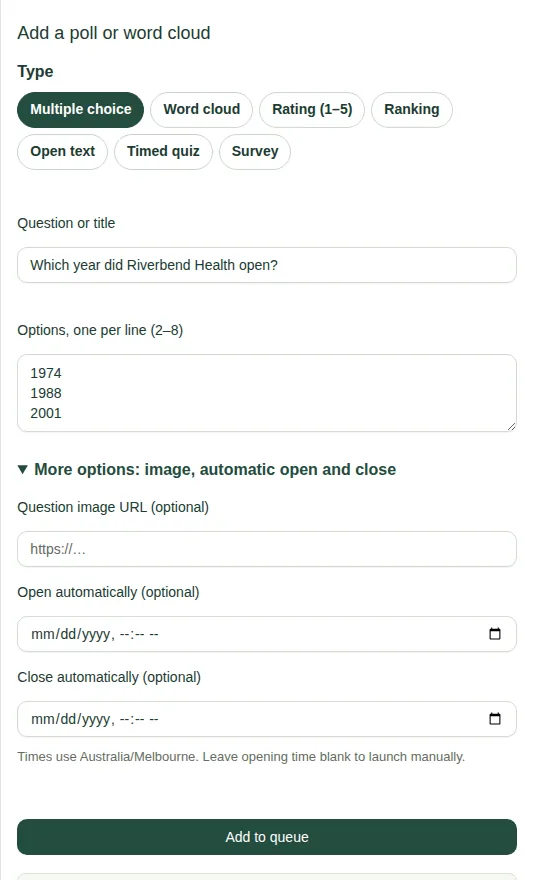
The types
| Type | What people do |
|---|---|
| Multiple choice | Pick one answer. |
| Word cloud | Type a short word or phrase. Popular words get bigger. |
| Rating (1–5) | Tap a number. |
| Ranking | Put a list in order. |
| Open text | Type a longer answer. |
| Timed quiz | Answer one question with a right answer before the countdown ends. |
| Survey | Answer several open questions in one form. |
Good to know
- Each quiz is one round. People's first answer counts. Results show participant numbers, not names.
- Polls and word clouds only run when they're switched on. See Turn features on and off.
- Next: Run a poll, or open and close it automatically.