Choose the meeting settings
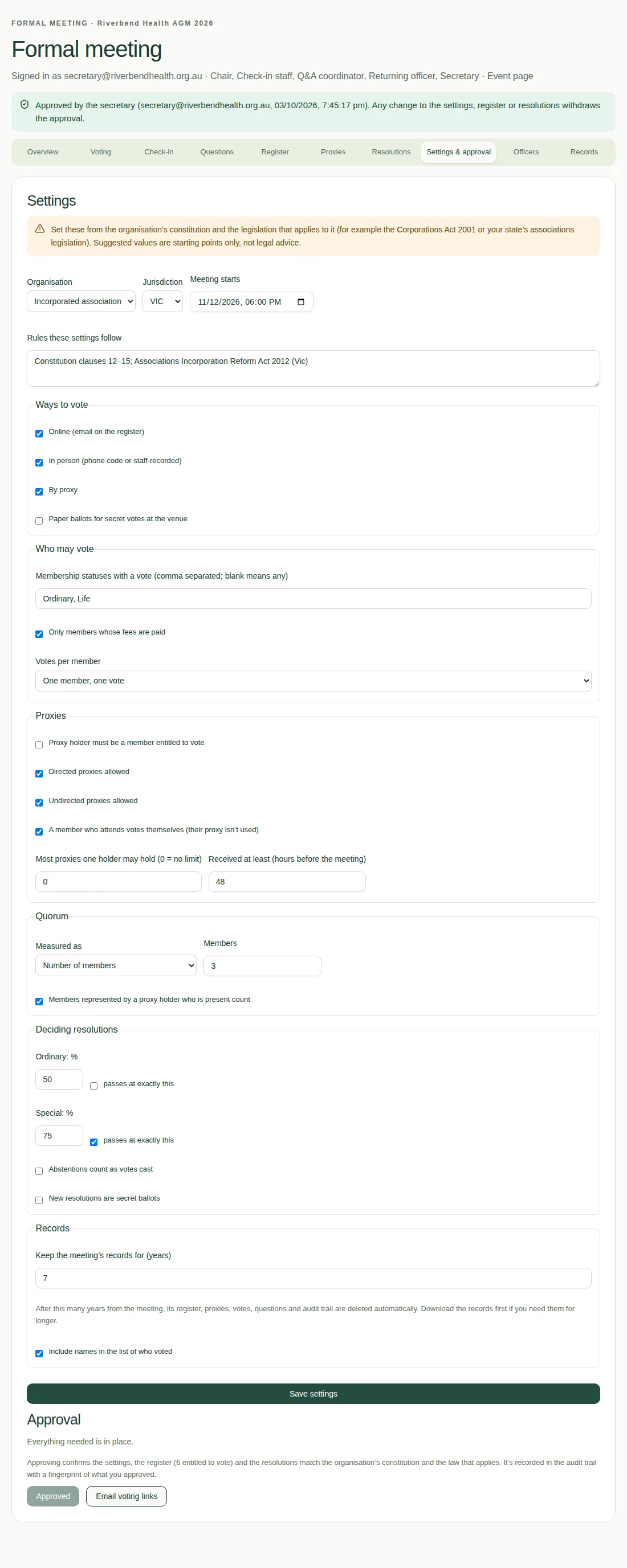
Set who can vote, how they vote, proxy rules, quorum, pass marks and records on the Settings & approval tab.
The secretary sets these on the Settings & approval tab. Set them from your organisation's constitution and the law that applies to it.
The settings
- Organisation: Incorporated association, Company, Co-operative or Other. Choosing one fills in sensible starting values.
- Jurisdiction: Cth, VIC, NSW, QLD, SA, WA, TAS, ACT or NT.
- Meeting starts: the date and time. This also sets the proxy deadline.
- Rules these settings follow: for example, the clauses of your constitution and the Act they come from.
- Ways to vote: online (using the email on the register), in person (phone code or recorded by staff), by proxy, and paper ballots for secret votes at the venue.
- Who may vote:
- the membership statuses that have a vote, for example "Ordinary, Life" (blank means any);
- only members whose fees are paid;
- Votes per member: one member, one vote, or weighted using the Votes column of the register.
- Proxies: whether the holder must be a member, whether directed and undirected proxies are allowed, whether a member who attends votes themselves, the most proxies one person may hold, and how many hours before the meeting proxies must arrive (48 by default).
- Quorum: a number of members, or a percentage of members entitled to vote, and whether proxies count. Quorum is the smallest number of members needed to make decisions.
- Deciding resolutions: the pass mark for Ordinary (more than 50% by default) and Special (at least 75% by default) resolutions, whether abstentions count as votes cast, and whether new resolutions are secret ballots.
- Records: how many years to keep the meeting's records, and whether names go in the list of who voted.
When you're done, choose Save settings.
Good to know
- Saving takes away any approval, so approve the meeting again afterwards.
- Once voting starts, the settings can't change.
- See Download the meeting records for how long records are kept.